How to setup Google Tag Manager For Shopify Owner [2024 Latest]
Introduction
Are you eager to unlock the true potential of your online presence with the insights provided by data analytics? Join me on this journey as I guide you through the essential steps of setting up Google Tag Manager and Google Analytics 4 for your website. In this comprehensive tutorial, I'll walk you through a beginner-friendly setup process, eliminating tech jargon and focusing on straightforward steps. By the end of this tutorial, you'll have the tools and knowledge to effectively track and analyze your website's performance, empowering you to make informed decisions for your online strategy.
Google Tag Manager Setup
Create a Google Tag Manager Account: Go to Google Tag Manager and sign in with your Google account. Click "Create Account" and follow the setup wizard. Enter an account name for your organization.

Create a Container:Within your GTM account, create a container for your website. Enter your website's URL and select the container type (Web).
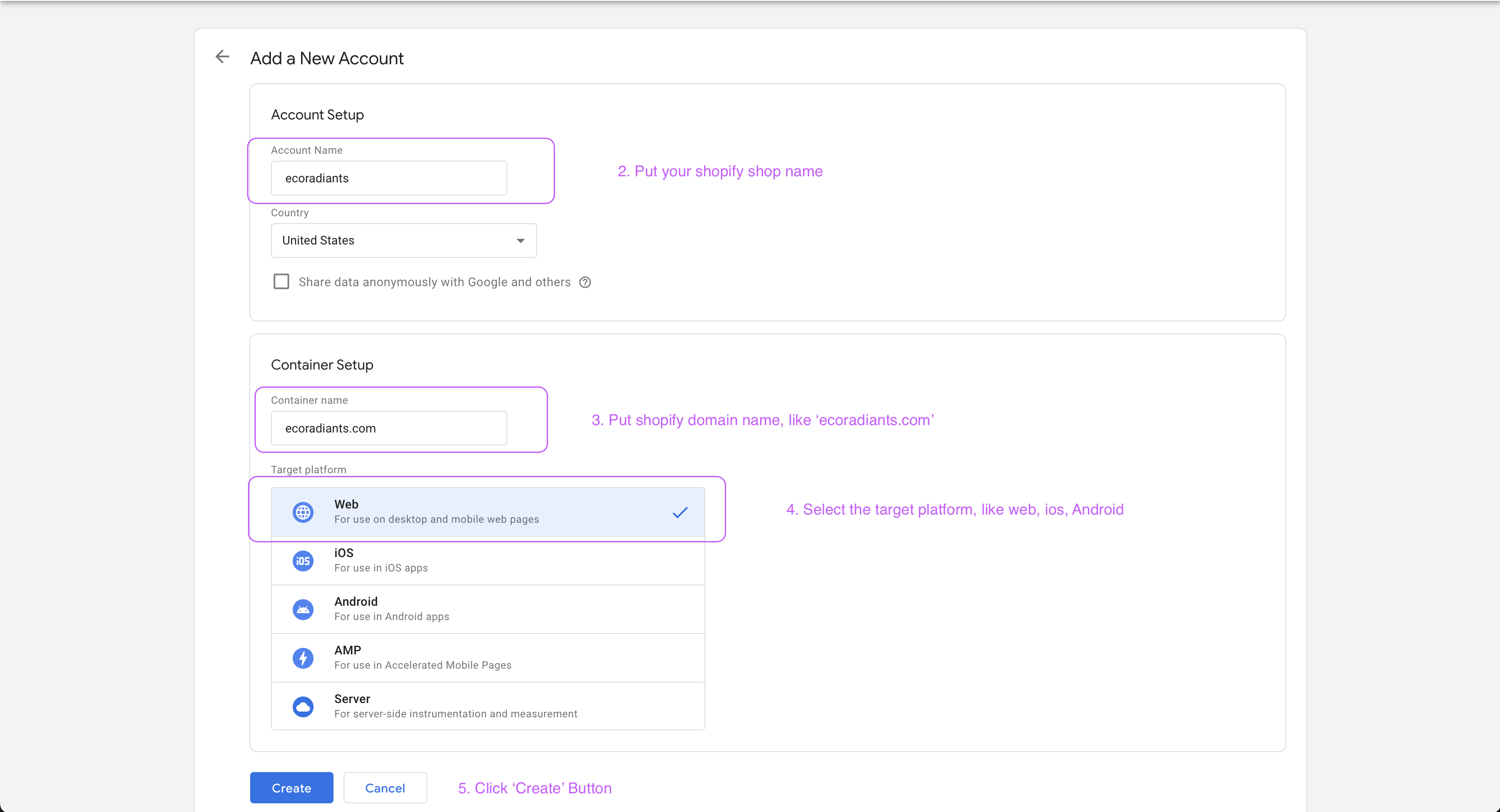
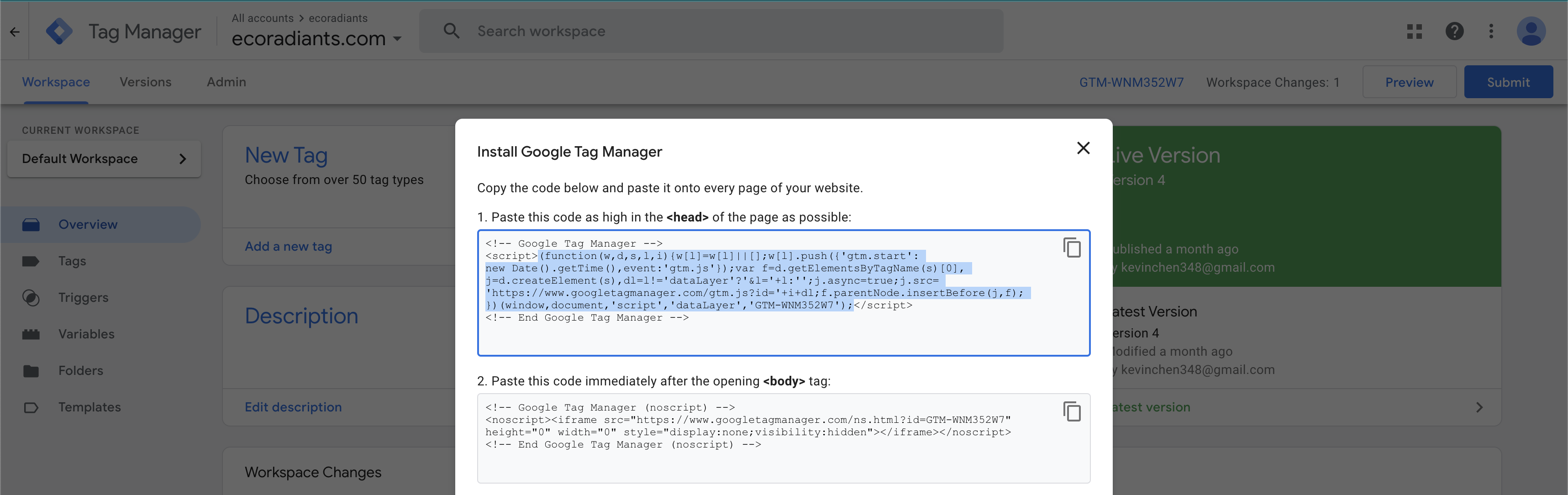
Copy the GTM Code:After creating a container, you'll be provided with a GTM container code snippet. Copy the head code for later use.
Shopify Setup
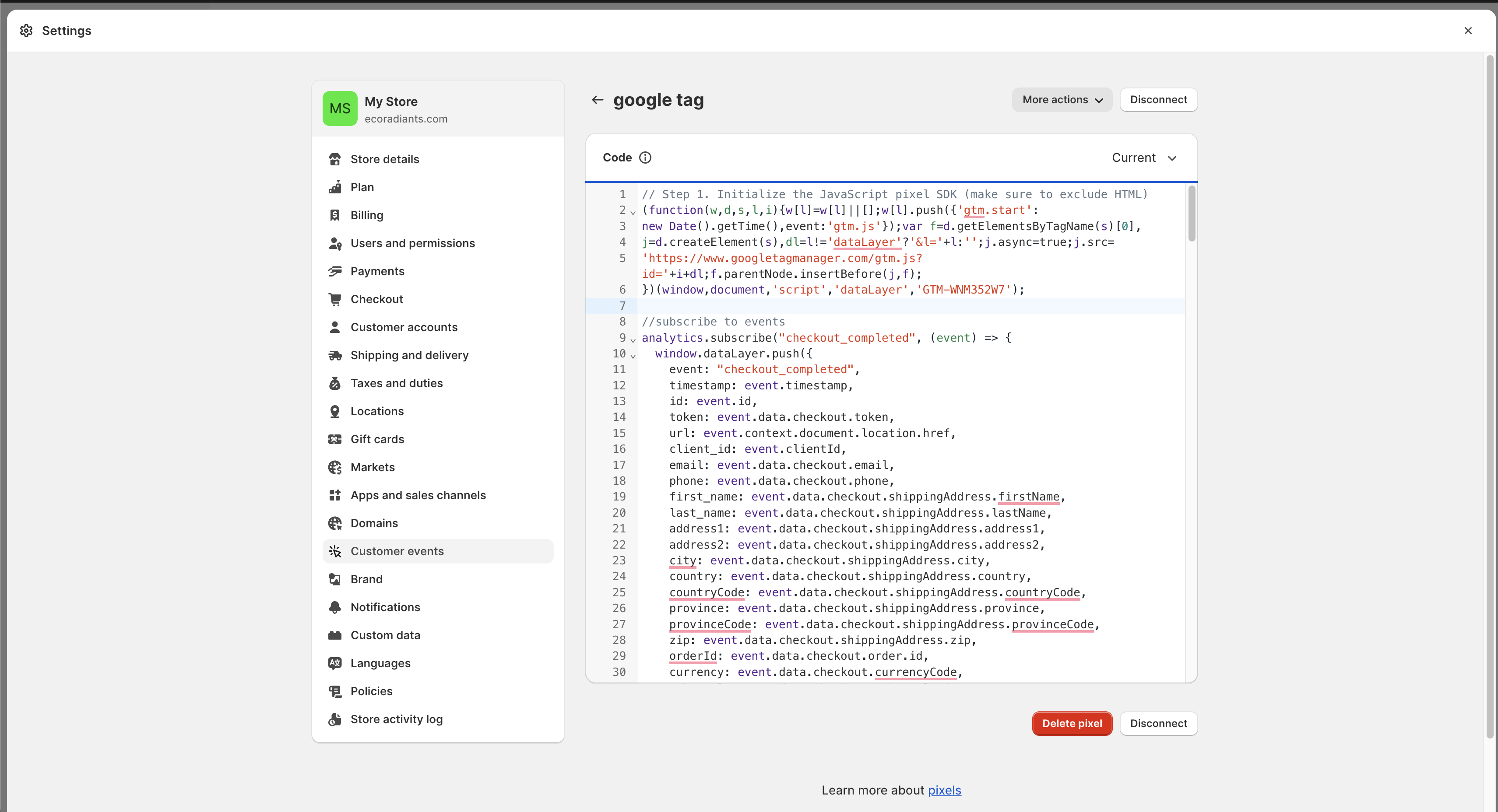
In Shopify settings, click "Custom events" from left menu, then click "Add custom pixel". Copy and paste the head you copied from last step and following code.
analytics.subscribe("checkout_completed", (event) => {
  window.dataLayer.push({
    event: "checkout_completed",
    timestamp: event.timestamp,
    id: event.id,
    token: event.data.checkout.token,
    url: event.context.document.location.href,
    client_id: event.clientId,
    email: event.data.checkout.email,
    phone: event.data.checkout.phone,
    first_name: event.data.checkout.shippingAddress.firstName,
    last_name: event.data.checkout.shippingAddress.lastName,
    address1: event.data.checkout.shippingAddress.address1,
    address2: event.data.checkout.shippingAddress.address2,
    city: event.data.checkout.shippingAddress.city,
    country: event.data.checkout.shippingAddress.country,
    countryCode: event.data.checkout.shippingAddress.countryCode,
    province: event.data.checkout.shippingAddress.province,
    provinceCode: event.data.checkout.shippingAddress.provinceCode,
    zip: event.data.checkout.shippingAddress.zip,
    orderId: event.data.checkout.order.id,
    currency: event.data.checkout.currencyCode,
    subtotal: event.data.checkout.subtotalPrice.amount,
    shipping: event.data.checkout.shippingLine.price.amount,
    value: event.data.checkout.totalPrice.amount,
    tax: event.data.checkout.totalTax.amount,
  });
});

analytics.subscribe("payment_info_submitted", (event) => {
  window.dataLayer.push({
    event: "payment_info_submitted",
    timestamp: event.timestamp,
    id: event.id,
    token: event.data.checkout.token,
    url: event.context.document.location.href,
    client_id: event.clientId,
    email: event.data.checkout.email,
    phone: event.data.checkout.phone,
    first_name: event.data.checkout.shippingAddress.firstName,
    last_name: event.data.checkout.shippingAddress.lastName,
    address1: event.data.checkout.shippingAddress.address1,
    address2: event.data.checkout.shippingAddress.address2,
    city: event.data.checkout.shippingAddress.city,
    country: event.data.checkout.shippingAddress.country,
    countryCode: event.data.checkout.shippingAddress.countryCode,
    province: event.data.checkout.shippingAddress.province,
    provinceCode: event.data.checkout.shippingAddress.provinceCode,
    zip: event.data.checkout.shippingAddress.zip,
    orderId: event.data.checkout.order.id,
    currency: event.data.checkout.currencyCode,
    subtotal: event.data.checkout.subtotalPrice.amount,
    shipping: event.data.checkout.shippingLine.price.amount,
    value: event.data.checkout.totalPrice.amount,
    tax: event.data.checkout.totalTax.amount,
  });
});

analytics.subscribe("checkout_shipping_info_submitted", (event) => {
  window.dataLayer.push({
    event: checkout_shipping_info_submitted,
    timestamp: event.timestamp,
    id: event.id,
    token: event.data.checkout.token,
    url: event.context.document.location.href,
    client_id: event.clientId,
    email: event.data.checkout.email,
    phone: event.data.checkout.phone,
    first_name: event.data.checkout.shippingAddress.firstName,
    last_name: event.data.checkout.shippingAddress.lastName,
    address1: event.data.checkout.shippingAddress.address1,
    address2: event.data.checkout.shippingAddress.address2,
    city: event.data.checkout.shippingAddress.city,
    country: event.data.checkout.shippingAddress.country,
    countryCode: event.data.checkout.shippingAddress.countryCode,
    province: event.data.checkout.shippingAddress.province,
    provinceCode: event.data.checkout.shippingAddress.provinceCode,
    zip: event.data.checkout.shippingAddress.zip,
    orderId: event.data.checkout.order.id,
    currency: event.data.checkout.currencyCode,
    subtotal: event.data.checkout.subtotalPrice.amount,
    shipping: event.data.checkout.shippingLine.price.amount,
    value: event.data.checkout.totalPrice.amount,
    tax: event.data.checkout.totalTax.amount,
  });
});

analytics.subscribe("checkout_address_info_submitted", (event) => {
  window.dataLayer.push({
    event: "checkout_address_info_submitted",
    timestamp: event.timestamp,
    id: event.id,
    token: event.data.checkout.token,
    url: event.context.document.location.href,
    client_id: event.clientId,
    email: event.data.checkout.email,
    phone: event.data.checkout.phone,
    first_name: event.data.checkout.shippingAddress.firstName,
    last_name: event.data.checkout.shippingAddress.lastName,
    address1: event.data.checkout.shippingAddress.address1,
    address2: event.data.checkout.shippingAddress.address2,
    city: event.data.checkout.shippingAddress.city,
    country: event.data.checkout.shippingAddress.country,
    countryCode: event.data.checkout.shippingAddress.countryCode,
    province: event.data.checkout.shippingAddress.province,
    provinceCode: event.data.checkout.shippingAddress.provinceCode,
    zip: event.data.checkout.shippingAddress.zip,
    orderId: event.data.checkout.order.id,
    currency: event.data.checkout.currencyCode,
    subtotal: event.data.checkout.subtotalPrice.amount,
    shipping: event.data.checkout.shippingLine.price.amount,
    value: event.data.checkout.totalPrice.amount,
    tax: event.data.checkout.totalTax.amount,
  });
});

analytics.subscribe("checkout_contact_info_submitted", (event) => {
  window.dataLayer.push({
    event: "checkout_contact_info_submitted",
    timestamp: event.timestamp,
    id: event.id,
    token: event.data.checkout.token,
    url: event.context.document.location.href,
    client_id: event.clientId,
    email: event.data.checkout.email,
    phone: event.data.checkout.phone,
    first_name: event.data.checkout.shippingAddress.firstName,
    last_name: event.data.checkout.shippingAddress.lastName,
    address1: event.data.checkout.shippingAddress.address1,
    address2: event.data.checkout.shippingAddress.address2,
    city: event.data.checkout.shippingAddress.city,
    country: event.data.checkout.shippingAddress.country,
    countryCode: event.data.checkout.shippingAddress.countryCode,
    province: event.data.checkout.shippingAddress.province,
    provinceCode: event.data.checkout.shippingAddress.provinceCode,
    zip: event.data.checkout.shippingAddress.zip,
    orderId: event.data.checkout.order.id,
    currency: event.data.checkout.currencyCode,
    subtotal: event.data.checkout.subtotalPrice.amount,
    shipping: event.data.checkout.shippingLine.price.amount,
    value: event.data.checkout.totalPrice.amount,
    tax: event.data.checkout.totalTax.amount,
  });
});

analytics.subscribe("checkout_started", (event) => {
  window.dataLayer.push({
    event: "checkout_started",
    timestamp: event.timestamp,
    id: event.id,
    token: event.data.checkout.token,
    url: event.context.document.location.href,
    client_id: event.clientId,
    email: event.data.checkout.email,
    phone: event.data.checkout.phone,
    first_name: event.data.checkout.shippingAddress.firstName,
    last_name: event.data.checkout.shippingAddress.lastName,
    address1: event.data.checkout.shippingAddress.address1,
    address2: event.data.checkout.shippingAddress.address2,
    city: event.data.checkout.shippingAddress.city,
    country: event.data.checkout.shippingAddress.country,
    countryCode: event.data.checkout.shippingAddress.countryCode,
    province: event.data.checkout.shippingAddress.province,
    provinceCode: event.data.checkout.shippingAddress.provinceCode,
    zip: event.data.checkout.shippingAddress.zip,
    orderId: event.data.checkout.order.id,
    currency: event.data.checkout.currencyCode,
    subtotal: event.data.checkout.subtotalPrice.amount,
    shipping: event.data.checkout.shippingLine.price.amount,
    value: event.data.checkout.totalPrice.amount,
    tax: event.data.checkout.totalTax.amount,
  });
});

analytics.subscribe("product_added_to_cart", (event) => {
  window.dataLayer.push({
    event: "product_added_to_cart",
    timestamp: event.timestamp,
    id: event.id,
    client_id: event.clientId,
    url: event.context.document.location.href,
    price: event.data.cartLine.merchandise.price.amount,
    currency: event.data.cartLine.merchandise.id,
    product_title: event.data.cartLine.merchandise.product.title,
    quantity: event.data.cartLine.quantity,
    total_cost: event.data.cartLine.cost.totalAmount.amount,
  });
});

analytics.subscribe("cart_viewed", (event) => {
  window.dataLayer.push({
    event: "cart_viewed",
    timestamp: event.timestamp,
    id: event.id,
    client_id: event.clientId,
    url: event.context.document.location.href,
    total_cost: event.data.cart.cost.totalAmount.amount,
    quantity: event.data.cart.totalQuantity,
    cart_id: event.data.cart.id,
  });
});

analytics.subscribe("page_viewed", (event) => {
  window.dataLayer.push({
    event: "page_viewed",
    timestamp: event.timestamp,
    id: event.id,
    client_id: event.clientId,
    url: event.context.document.location.href,
    page_title: event.context.document.title,
  });
});

analytics.subscribe("product_viewed", (event) => {
  window.dataLayer.push({
    event: "product_viewed",
    timestamp: event.timestamp,
    id: event.id,
    client_id: event.clientId,
    url: event.context.document.location.href,
    product_id: event.data.productVariant.product.id,
    product_title: event.data.productVariant.title,
    product_sku: event.data.productVariant.sku,
  });
});

analytics.subscribe("search_submitted", (event) => {
  window.dataLayer.push({
    event: "search_submitted",
    timestamp: event.timestamp,
    id: event.id,
    client_id: event.clientId,
    url: event.context.document.location.href,
    query: event.data.searchResult.query,
  });
});

analytics.subscribe("collection_viewed", (event) => {
  window.dataLayer.push({
    event: "collection_viewed",
    timestamp: event.timestamp,
    id: event.id,
    client_id: event.clientId,
    url: event.context.document.location.href,
    collection_id: event.data.collection.id,
    collection_title: event.data.collection.title,
  });
});
It will look like:
Google Analytics 4 Setup
Create a Google Analytics 4 Property:Go to Google Analytics and sign in with your Google account. Click "Admin," then under the "Property" column, click "Create Property."Follow the setup wizard, and choose "Web" as the platform.
Configure Your GA4 Property:Enter the website name, URL, and time zone. Enable options like "Enhanced Measurement" and "Use Enhanced Conversions" for additional tracking.
Get the GA4 Measurement ID:After creating the property, you'll be provided with a Measurement ID (e.g., G-XXXXXXXXXX). Keep this ID handy; you'll need it for GTM.
Connect GTM to GA4
In GTM:Inside your Google Tag Manager container, go to "Tags."Click "New" to create a new tag. Choose "Google tag"
Configure the GA4 Tag:Enter the Measurement ID you obtained from GA4. Define your trigger for when you want GA4 to fire (typically on All Pages).
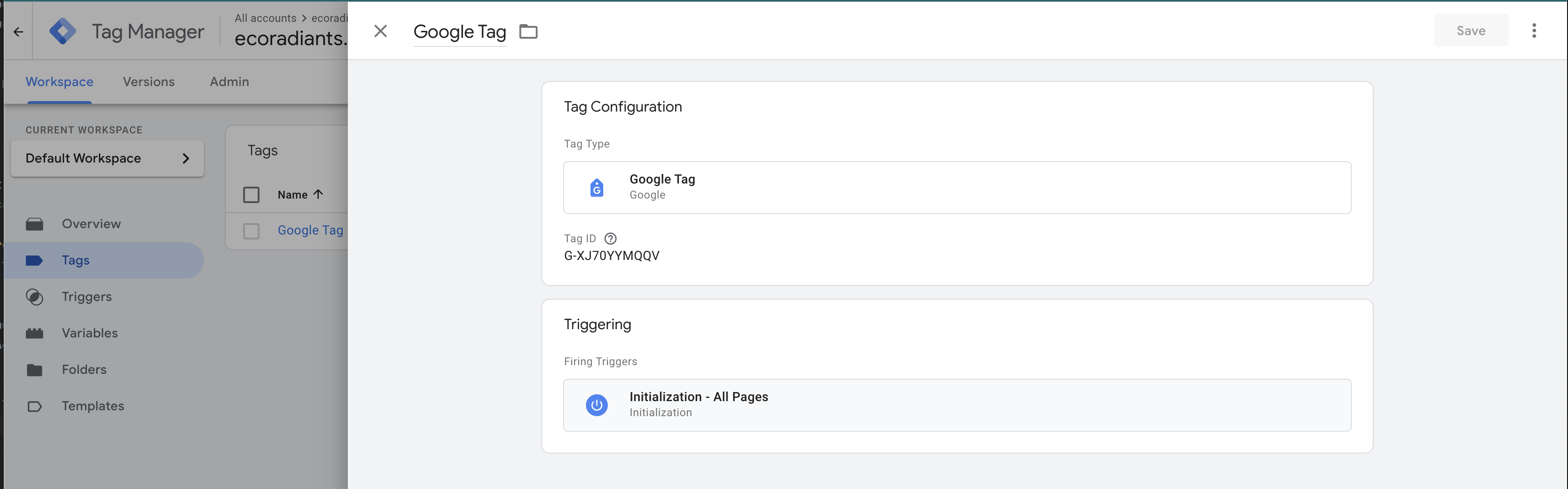
Publish the Tag:Click "Submit" to publish the GA4 Configuration tag.